HKS0401A2U mouse/keyboard not recognized on Mac

My HKS0401A2U was working fine with my MacBook Air (13-inch M3 2024) for many months until recently. Most likely it was an OS change one or two updates ago. It is currently running Sequoia 15.6.1.
Is there a firmware upgrade for my KVM? If not, what's the path forward?
Thanks,
N
-
正式なコメント

Dear Customer,
Thank you for reaching out to TESmart support. We sincerely apologize for the inconvenience caused for you.
Regarding the issue with your KVM mouse and keyboard not being passed to the MacBook Air, we recommend performing a firmware upgrade on your KVM device. We have attached a firmware upgrade package (HKS0401A2U-SOFMUS1-CH545-V004 ) and a detailed SOP to guide you through the process.
To proceed with the upgrade, please download the necessary upgrade tool and upgrade package using the following link:
HKS0401A2U upgrade tool and firmware upgrade package– TESmartOnce the upgrade is complete, please test the functionality to see if the issue is resolved. If the problem persists or if you encounter any difficulties during the upgrade process, feel free to reply to this email, and we will assist you further.
Thank you for choosing TESmart, and we appreciate your understanding and cooperation.
Best regards,
-
Hello,
1. Where do I access the firmware upgrade package? I do not see an attachment with this post or in the emailed copy.
2. In the chip reprogramming guide, there is a picture showing which PCB holes to short-circuit. The picture does not match what is on my PCB. Here is a photo of mine: https://cdn.imgchest.com/files/4jdcvedqnd4.jpg Can you confirm these are the correct holes to short circuit? My board is labeled “HKS0401A2U 32.02.0135.”
Thanks,
N
0 -

Dear Customer,
Thank you for your reply.
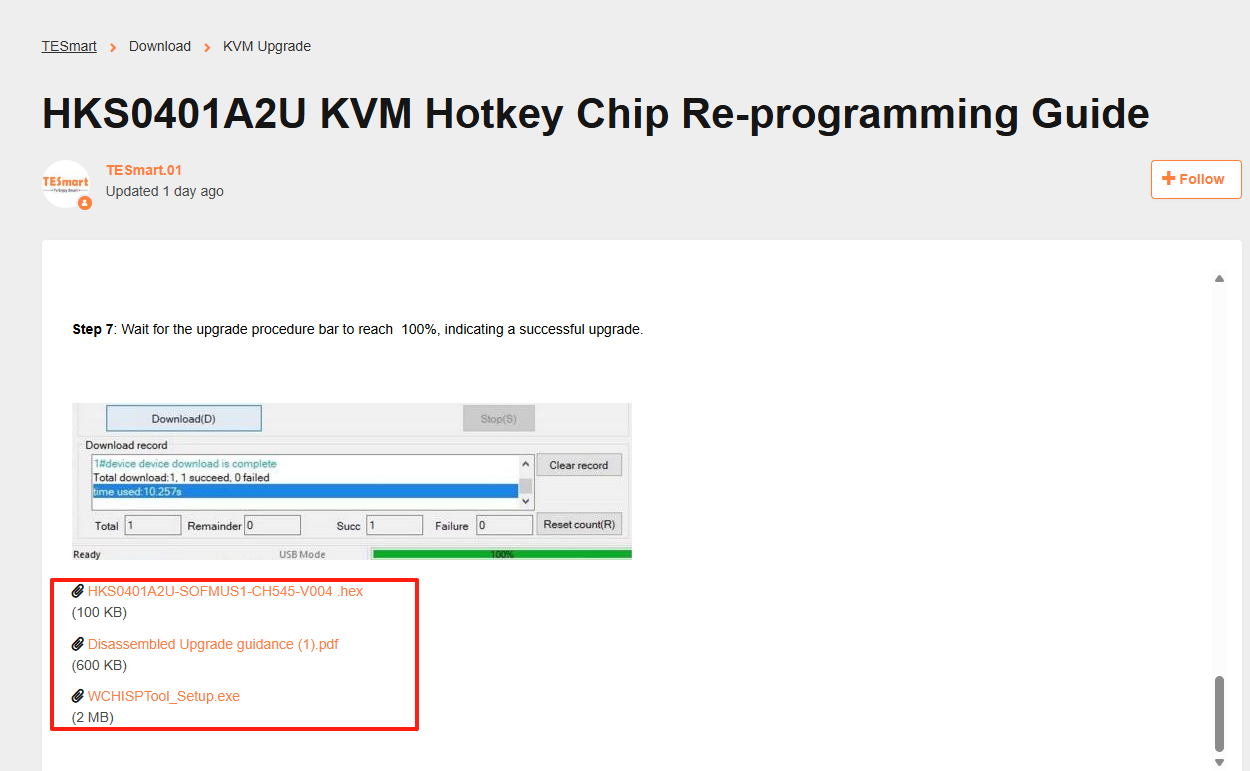
Please click the following link to access the HKS0401A2U upgrade tool and firmware upgrade package – TESmart. Scroll down to the bottom of the page, where you will find both the firmware upgrade tool and the firmware package, as shown in the screenshot below.
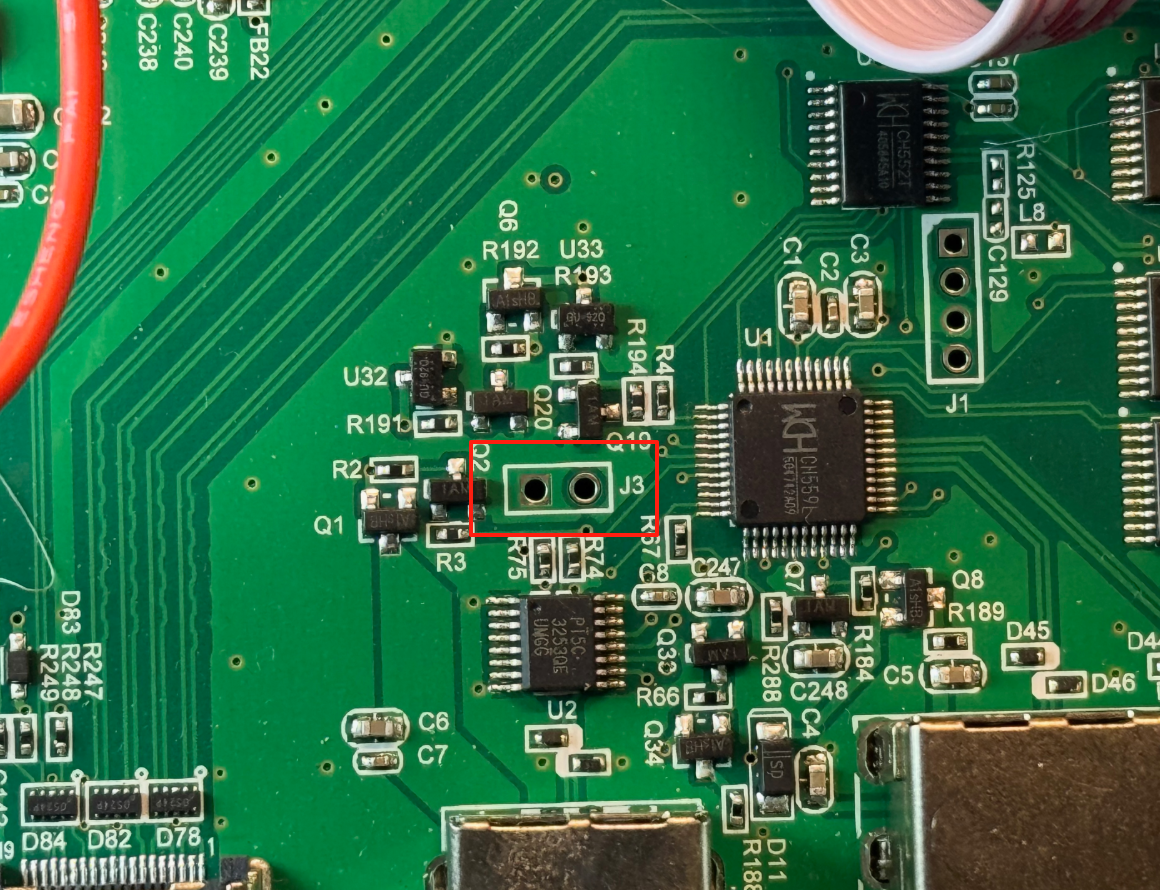
Additionally, The part circled in red in the picture is the place that needs to be short-circuited.
Any questions, please feel free to contact us anytime.
Thank you for your support.
Best regards,
0 -
Hello Support,
I performed the update steps and WCHISPTool reported 100% completion. However when I power plug in the KVM and power on, either (1) nothing happens or (2) the unit emits a loud continuous beep. The front panel lights do not light up. The KVM is effectively dead.
Note that during the update attempt, the unit detects a chip model 559 (not 545). See: https://cdn.imgchest.com/files/y8xcnjaz594.jpg This seems correct as one can see a chip labeled 559 on my board. (See previous photo https://cdn.imgchest.com/files/4jdcvedqnd4.jpg) Maybe I need a different user file?
-N
0 -
Dear Customer,
Thank you for your reply.
The 545 chip upgrade package is compatible with the 559 chip. If the issue persists after upgrading to the 545 chip upgrade firmware, could you please provide your current order information? You can submit a support ticket, and our team will assist you further in resolving the issue.
Thank you for your cooperation and understanding.
Best regards,
0


)
サインインしてコメントを残してください。
コメント
5件のコメント