Correct Resolution Not Always Detected

I have a TESmart HKS402-P23 with a Dell U3821 DW monitor (3840 x 1600 native resolution) attached to HDMI output A and a Dell S2722DGM monitor (2560 x 1440 native resolution) attached to HMI output B. I have a Dell Latitude 5520 with a Thunderbolt docking station with dual HDMI outputs connected to a set of input ports on the KVM. When I have the laptop lid open, all monitors use their native resolution. If I close the laptop, the resolution on the S2722DGM monitor changes to 1920 x 1080. I suspect this is an issue with EDID. Does any one have suggestions on how to get the KVM to recognize the native resolution of the S2722DGM monitor with the laptop lid closed?
-
正式なコメント

Dear Bob Hines,
Thank you for your message, and we are sorry to hear about the issue you are experiencing. Please rest assured that we will assist you in resolving this.
As you mentioned, when the laptop lid is closed, the graphics driver may re-detect the display topology and re-trigger EDID negotiation. To better help us identify the root cause, could you kindly assist us with the following checks:
- When all your devices are connected through the KVM, does the Dell S2722DGM monitor automatically switch back to 2560×1440 once you reopen the Dell Latitude 5520 laptop lid (after it had dropped to 1920×1080 when the lid was closed)?
- Could you try manually setting the Dell S2722DGM resolution to 2560×1440 in Windows display settings and confirm whether it can be forced and maintained?
- Please try connecting the Dell S2722DGM monitor directly to the Dell Latitude 5520 laptop (bypassing the KVM) and check if the monitor can output 2560×1440 correctly in this case.
Your feedback on these tests will help us further narrow down whether the issue lies with EDID handling through the KVM or with the system configuration itself.
We look forward to your reply.
Best regards,
-
Thank you for your response.
There have been times when reopening the laptop has returned the Dell S2722DGM monitor back to its native resolution and times when the Dell S2722DGM monitor changed from the 1920x1080 resolution to a resolution different from its native resolution.
When I attempt to manually set the monitor resolution with Windows display settings, no resolution higher than 1920x1080 is listed in the drop-down list. I also noted that at times there is no “recommended” resolution in the list.
Connecting the Dell S2722DGM monitor directly to the laptop works fine. I can set its resolution to 2560x1440 with no issues.
Additionally, please be aware of the following:
- I have applied the latest version of the firmware (HKS0402A2U_KM_SOFMUS2-V006.bin) to the KVM.
- I have also downloaded and run the CRU application, but I am unsure how to use it.
- I previously had the KVM working without issue with the Dell S2722DGM.
- I have Selore SEUC0517 docking stations (https://seloreglobal.com/products/selore-laptop-docking-station) connected to all computers. The docking station's HDMI ports are connected to the KVM's input ports.
Thanks for your kind assistance.
0 -
Dear Bob Hines,
Thank you for your reply.
After reviewing your feedback, our analysis indicates that the core issue is related to EDID handling in the chain of Laptop (lid closed) + Dock + KVM. In this scenario, the resolution is being downgraded to 1080p. The most likely cause is that the Dock’s EDID forwarding is not fully stable, and as a result, the KVM’s EDID emulation cannot maintain 2560×1440 consistently.
To help us confirm whether the Dock is the root cause, could you please try the following test:
- Connect your Dell S2722DGM monitor → KVM → Laptop directly (bypassing the Dock).
- If the monitor works correctly at 2560×1440 in this setup, it would confirm that the Dock’s EDID compatibility is causing the resolution downgrade.
Your confirmation on this point will allow us to provide more precise guidance.
Best regards,
0 -
Thank you for your reply.
I have been able to do some additional testing and here's what I have found:
- I have two Dell Latitude computers that are very similar - one a 5520 and the other a 5530. Both have a Selore SEUC0517 docking station attached (https://seloreglobal.com/products/selore-laptop-docking-station).
- Connecting the monitor to my Latitude's built-in HDMI port works as expected at 2560x1440 resolution.
- All works as desired with the 5530 (i.e., Dell S2722DGM has resolution of 2560x1440).
- The highest resolution available on the 5520 is 1920x1080 when using the docking station.
- I have tried using CRU to duplicate the settings from the 5530 on the 5520 but it made no difference.
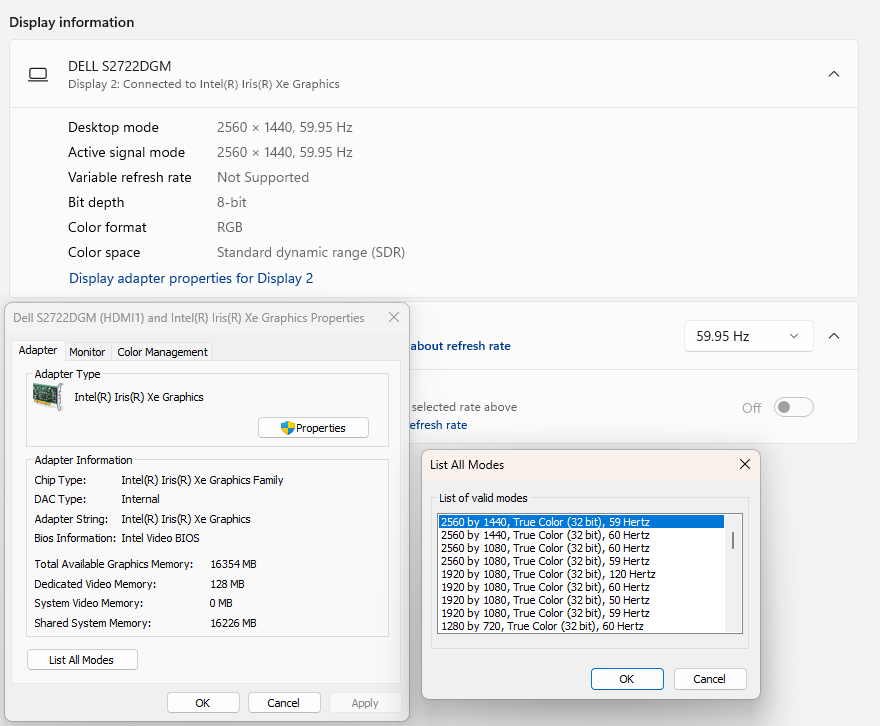
For your information, here are screenshots from the computers:
Dell 5530: Everything is working @ 2560x1440.
Dell 5520 using docking station video output: Highest resolution is 1920x1080.
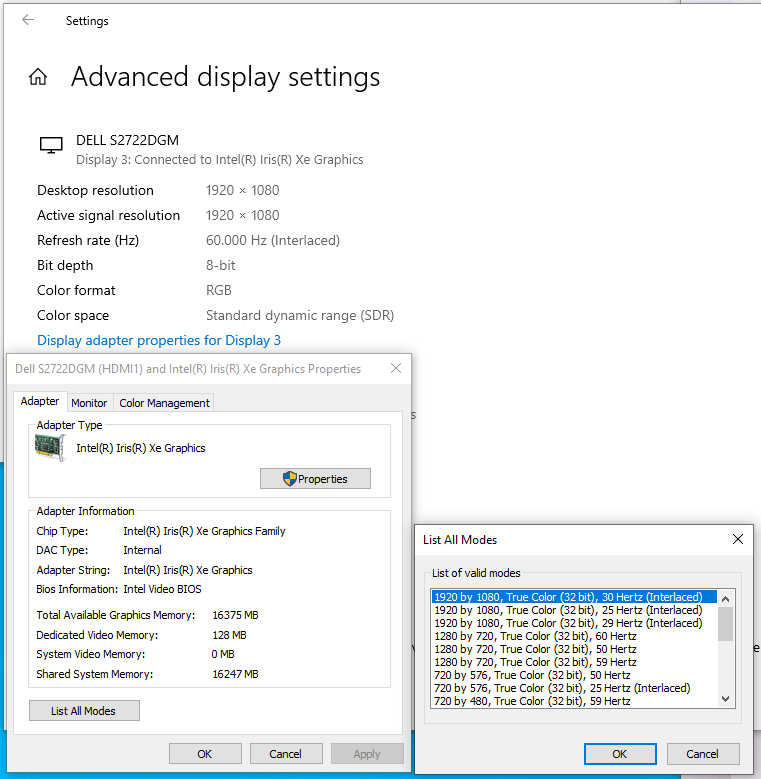
I don't know why 2560x1440 is not listed as a valid mode in the screenshot above.
Dell 5520 using built-in HDMI port: Everything working at 2560x1440 resolution
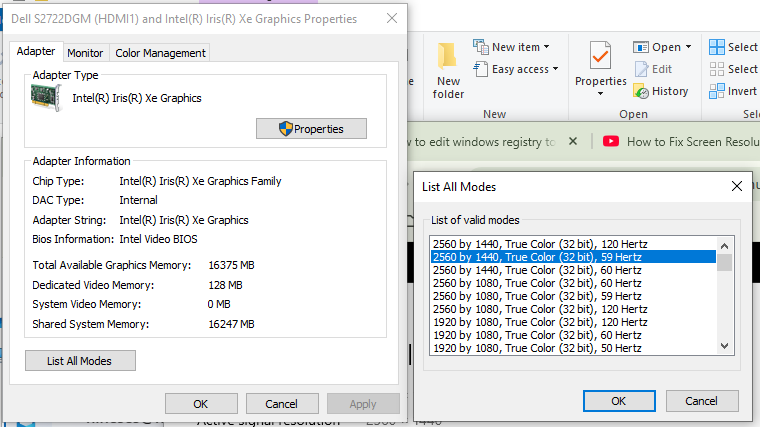
There is definitely an issue with the docking station attached to the Dell 5520 but it is the same model as the docking station attached to the Dell 5530 which works fine. Previously, I was able to set the 2560x1440 resolution on the Dell 5520 using the same docking station before I had to move my system.
I hope this provides some valuable clues as to what the issue may be.
Best regards,
Bob Hines
0 -
Dear Bob Hines,
Thank you for your reply and for providing the screenshots to help us investigate this issue.
The Dell 5520 is limited to a maximum resolution of 1920×1080 when connected through the docking station, while the Dell 5530 using the same docking station works correctly at 2560×1440. Given this difference, could you please try the following steps to further isolate the cause:
1. Driver/System Check – Has your Dell 5520 recently undergone any driver or system updates? If so, please try updating or rolling back the Intel graphics driver and check if the resolution issue is resolved.
2. EDID/Connection Check – Since the monitor’s EDID may not be recognized correctly, please try using a different HDMI cable or switching to another HDMI port on the docking station to see if the correct 2560×1440 resolution becomes available.
Please let us know the results of these tests. Looking forward to your reply.
Best regards,
0 -
Thank you for your response.
However, I think you are incorrect because at one time I was consistently using the Latitude 5520, the docking station, and the KVM at the 2560x1440 resolution.
All drivers are up to date. I have used different cables and swapped ports but obtained the same results.
Regards,
0 -
Dear Bob Hines,
Thank you for your reply and for pointing out the issue. You are correct — the Latitude 5520, dock, and KVM were previously used at 2560x1440 resolution for a period of time. We are currently analyzing whether there might be any driver or system updates contributing to this situation.
Please rest assured that we will work closely with our R&D team to attempt to reproduce the issue and provide you with further updates ASAP. We truly appreciate your patience and understanding while we investigate this matter.
Thank you again for your valuable feedback.
Best regards,
0
サインインしてコメントを残してください。
コメント
7件のコメント