How do I get HKS202 to respect true 10bit color on my monitor?

My Windows 11 machine shows my Samsung Odyssey G8 monitor only supporting 8 bit color. How do I get it to report the true 10bit color so HDR10/Dolby Vision is honored?
When I connect the monitor directly to my PC using either of the HDMI cables involved it reports 10bit color and peak brightness of 1000 nits.
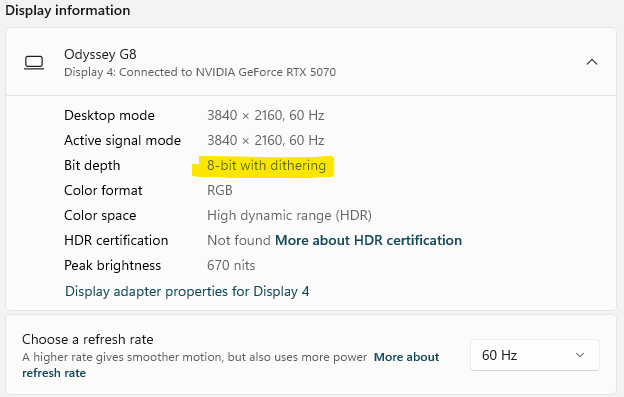
-
正式なコメント

Dear Mr. Groovy,
Thank you very much for your message.
After checking, we noticed that your Samsung G8 monitor supports a resolution and refresh rate of 4K@240Hz. To better assist you in resolving the 10-bit color and HDR issue you're experiencing, could you please confirm the exact KVM model you purchased?
Specifically, we would like to know whether you are using the HKS202-P23 or the HKS202-M24 model.This information will help us quickly identify the root cause and provide a targeted solution.
Looking forward to your reply.
Best regards,
-
Thank you for responding,
I am using the HKS202-P23 model. You are right about the G8 that it can achieve 4k@240hz but I only use 4k@60hz.
0 -
Dear Mr. Groovy,
Thank you for your reply.
Your setup — the Samsung G8 monitor + NVIDIA RTX 5070 — exceeds the bandwidth limitations of HDMI 2.0. The HKS202-P23 KVM switch is based on the HDMI 2.0 standard, which supports a maximum of 4K@60Hz resolution with 8-bit color depth output.
If you would like your G8 monitor to display 10-bit color depth, higher bandwidth KVM is required. Please kindly reference the upgraded model of HKS202-P23, the HKS202-M24, which is based on HDMI 2.1 and supports up to 8K@60Hz with 12-bit color depth. This model fully supports HDR10, and high refresh rates without compromising image quality.
You can find more information about the HKS202-M24 here:
👉 https://www.tesmart.com/collections/for-2-pcs-2-monitors/products/hks202-m24If you have any further questions, please feel free to contact us. We’re always happy to assist.
Best regards,
0 -
Okay, this makes sense. Of the information I could find online it suggested that this model supported 10bit color depth because of HDR10 & Dolby Vision support. I purchased the 8k model from Amazon and will return this one.
Thank you for your quick response. I have been trying several various KVMs but they have all had some kind of problem. I think I am finally settling with TESmart. :)
Cheers
0 -
Dear Mr. Groovy,
Thank you for choosing our HKS202-M24 8K KVM switch — we truly appreciate your trust in TESmart.
We’re very glad to have been able to help resolve your issue, and if you have any questions or need assistance with setup, features, or anything else, please feel free to contact us at any time — we’re always here to help.
Looking forward to hearing about your experience with the new device!
Best regards,
0 -
I received the updated model and it is working well. It does recognize the 10 bit color depth of my monitor:
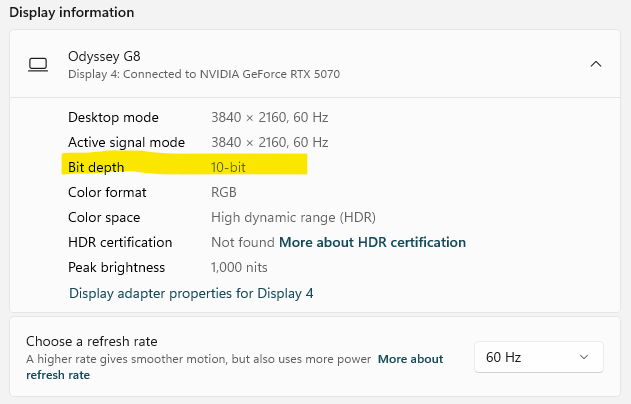
I truly like this KVM, especially the flexible hotkey (OMG, I can double click my zoom button to switch computers!!). My only gripe is that it has an internal fan and it is louder than I prefer (not really loud, but in a quite office it is noticeable – especially sitting right next to me). I can live with this as the rest of its features make up for it. :)
Thank you again.
Cheers!0 -
Dear Mr. Groovy,
Thank you for your feedback for the HKS202-M24 KVM switch. We truly appreciate your input!
Regarding the fan feature, yes, this KVM model is equipped with a built-in fan to help with better heat dissipation. You can use the [Right Ctrl] → [Right Ctrl] → [F3] shortcut keys to disable/enable the fan function.
The KVM supports 4 adjustable modes, distinguishable by the number of beeps from the buzzer. The default fan mode is 2.
- Fan Mode 1: The fan is disabled. Adjust to this mode, the buzzer will beep once.
- Fan Mode 2: The fan speed is automatic. It operates at high speed when video signal transmission is active and shuts off when no video signal is detected. Adjust to this mode, the buzzer will beep twice.
- Fan Mode 3: The fan operates at low speed continuously. Adjust to this mode, the buzzer will beep three times.
- Fan Mode 4: The fan operates at high speed continuously. Adjust to this mode, the buzzer will beep four times.
Feel free to adjust the fan mode based on your usage needs.
Once again, thank you for your valuable feedback!
Best regards,
0
サインインしてコメントを残してください。
コメント
7件のコメント